
Run every in-person program from one system.
Invitations, approvals, registration, e-signatures, reminders and check-in all work together, under your brand and on your web address.
Already built and tested end to end for a company that runs in-person professional programs.
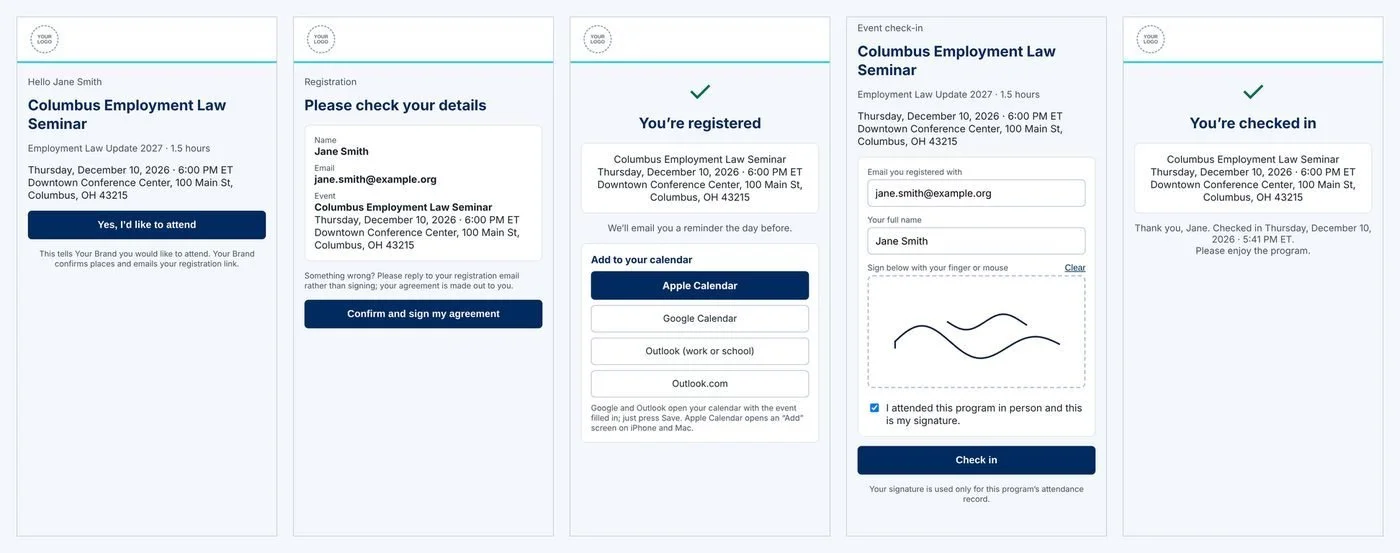
What an attendee sees, on their phone
Invitees say they would like to attend, staff approve them, and approved people get a personal registration link.
From invitation to attendance record
1. Invitation
Staff build an event and pick people from a contact list. Personal emails go out with the event details and an "I'd like to attend" button.
2. Interest and approval
Staff approve or decline in one place, which helps with seat limits and guest lists.
3. Registration and e-signature
The participant confirms their details and signs the right agreement. The system records whether payment and W-9 details are on file and never displays them.
4. Confirmation and reminder
The participant can add the event to Google, Outlook or Apple calendars. An email reminder goes out the day before.
5. Check-in
Attendees scan a QR code at the door. Staff can also check people in by hand, record paper sign-ins and add walk-ins.
6. Attendance record
A clean after-event record is ready for compliance or marketing files.
One page for your staff
One phone-friendly page per event shows who is interested, approved, registered and checked in, with approvals, a check-in list and a follow-up list.
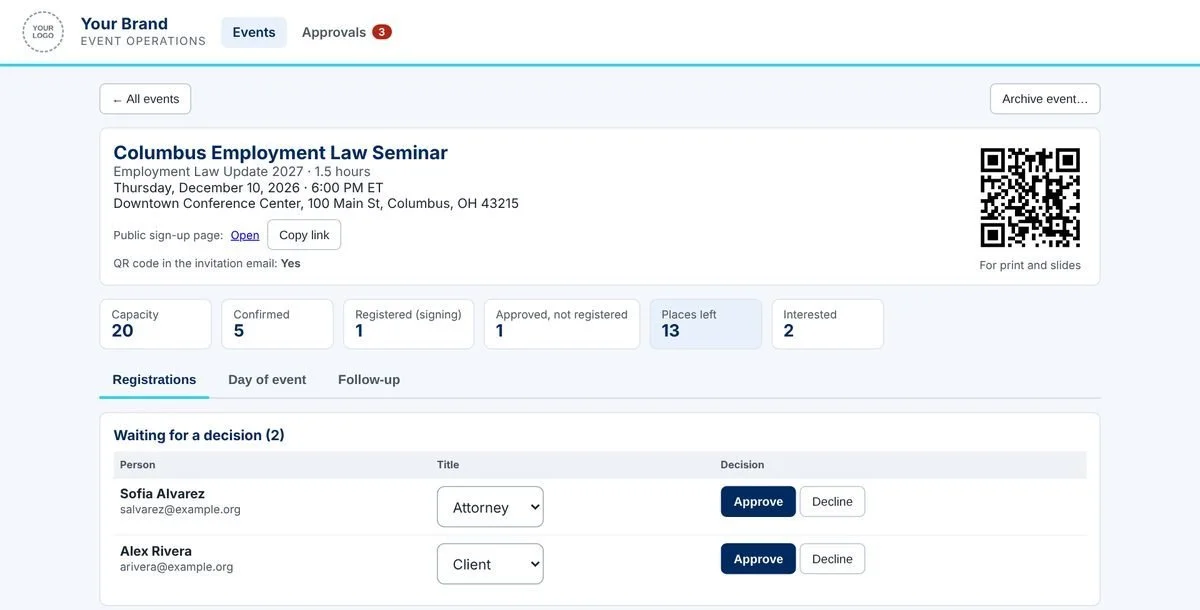
Built in from the start
Email delivery
Bounced or undelivered emails are flagged so staff can fix addresses.
Audit trail
Changes to events are logged: who changed what, and when.
White label
Pages and emails carry your brand and run on your own web address.
Safe by design
Test mode lets you try new events end to end without emailing real people. Staff sign in with emailed one-time codes.
Ask your AI assistant in plain English
Staff connect once with an emailed code. After that, they can ask inside their AI app. Anything that changes records, or emails people, asks the person to confirm first and needs a fresh code.
"What events do we have coming up?"
"Who said they'd like to attend Thursday's program?"
"Approve these three."
"Send additional invitations."
"How many have checked in?"
"Which emails bounced?"
The AI assistant works inside Claude today. Other apps, such as ChatGPT and Microsoft Copilot, are adopting the same open standard, called MCP. Support depends on the app and your plan.
A separate operations assistant lets the system owner check health and usage, and pause sending in an emergency.
Fully customizable
Every part of the system can be customized. We can add or remove features, change the steps, wording and emails, and connect it to other tools you use, so it fits the way you already work.
Steps, wording, emails and branding can all be changed.
Features can be added or removed.
It can connect to calendars, CRM, e-signature and email tools you already use.
It works on phones for both attendees and staff.
It runs on proven cloud services for your database, automation, e-signature and email, rather than custom servers.
See it with your own events.
Book a walkthrough and we'll show you how it could work for your programs.